
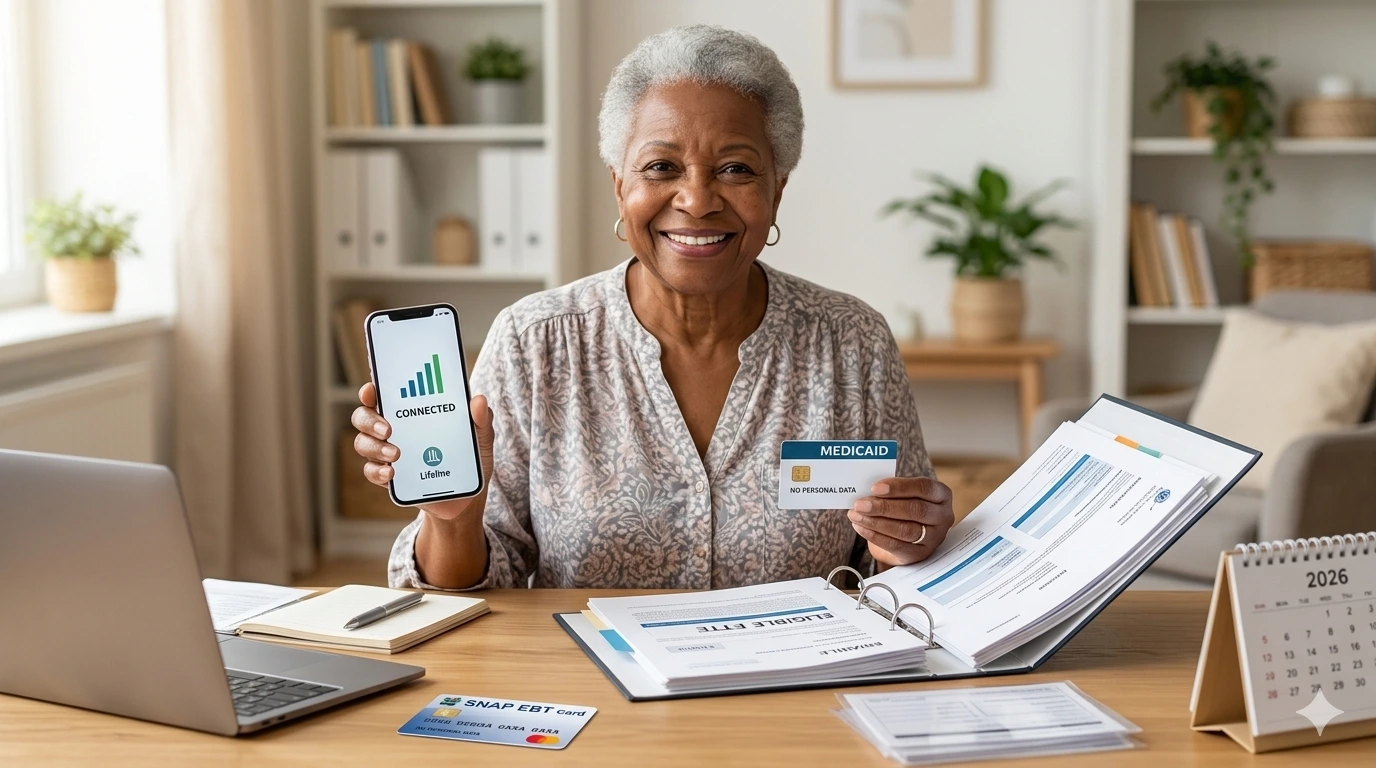
Can you get a free phone with Medicaid?
You may be able to.
Medicaid is one of the programs that can qualify you for the federal Lifeline benefit.
But there is an important difference.
Medicaid does not give you a free phone.
Lifeline helps lower the cost of phone or internet service. Some wireless companies that take part in Lifeline may also offer a free smartphone.
That phone offer comes from the company.
It is not a phone sent by Medicaid or the federal government.
Phone models, plans, prices, and stock can change. Your ZIP code can also affect what you get.
This guide explains how the process works.
Quick Answer: How Does a Medicaid Free Phone Work?
The process is simple:
Medicaid → Lifeline eligibility → choose a Lifeline provider → check its free-phone offer
If you have Medicaid, you can use your program participation to qualify for Lifeline.
After approval, you choose a phone or internet company that offers Lifeline in your area.
Some wireless companies offer plans that cost $0 per month.
Some also offer a free or low-cost smartphone.
A free device is not guaranteed.
What Is the Medicaid Free Phone Program?
There is no federal program officially called the Medicaid Free Phone Program.
People use that term because Medicaid can qualify them for Lifeline.
Lifeline is a federal program.
The Universal Service Administrative Company, or USAC, runs the program under the oversight of the Federal Communications Commission.
Lifeline helps eligible households pay for phone or internet service.
The standard benefit can provide a monthly service discount.
Some wireless companies use that support to offer a $0 monthly phone plan.
They may also add a phone promotion.
This is why you may see terms such as:
Medicaid free phone
Free government phone with Medicaid
Medicaid government phone
Free smartphone with Medicaid
They usually refer to Lifeline.
Does Medicaid Qualify You for Lifeline?
Yes.
Medicaid is one of the main programs that can qualify you for Lifeline.
You may qualify if you or a child or dependent in your household receives Medicaid.
Other standard qualifying programs include:
SNAP
Supplemental Security Income
Federal Public Housing Assistance
Veterans Pension and Survivors Benefit
Certain Tribal assistance programs can also qualify.
You do not have to qualify through both Medicaid and income.
One path is enough.
What If You Do Not Have Medicaid?
You may still qualify for Lifeline.
One option is your household income.
For 2026, standard Lifeline income eligibility is set at 135% or less of the Federal Poverty Guidelines.
2026 Lifeline Income Limits
| Household Size | 48 States, D.C. & Territories | Alaska | Hawaii |
|---|---|---|---|
| 1 | $21,546 | $26,933 | $24,786 |
| 2 | $29,214 | $36,518 | $33,602 |
| 3 | $36,882 | $46,103 | $42,417 |
| 4 | $44,550 | $55,688 | $51,233 |
| 5 | $52,218 | $65,273 | $60,048 |
| 6 | $59,886 | $74,858 | $68,864 |
| 7 | $67,554 | $84,443 | $77,679 |
| 8 | $75,222 | $94,028 | $86,495 |
For each extra household member, add:
$7,668 in the 48 states, D.C., and territories
$9,585 in Alaska
$8,816 in Hawaii
If Medicaid already qualifies you, you normally do not need to use the income route.
What Does Lifeline Give You?
Lifeline mainly pays toward your monthly service.
It is not mainly a phone giveaway program.
The standard federal benefit can provide up to:
$9.25 per month toward eligible internet or bundled service
$5.25 per month toward voice-only service
$34.25 per month for eligible households on qualifying Tribal lands
A phone company decides what plan it offers with that benefit.
Some providers have a $0 monthly plan.
A plan may include:
Talk
Text
Mobile data
Voicemail
Caller ID
Hotspot data on some plans
International calling on some plans
The amount of data can differ by company and state.
Can You Really Get a Free Phone With Medicaid?
Yes, in some cases.
Several Lifeline companies run free-phone promotions for eligible customers.
However, Medicaid approval does not mean you can pick any phone you want.
The provider controls the device offer.
You may receive:
A basic Android smartphone
A Motorola phone
A Samsung phone
A TCL or similar device
An older or refurbished phone
A SIM card for a phone you already own
Some providers also sell better phones as paid upgrades.
Read the exact offer before you enroll.
Which Providers Offer Lifeline With Medicaid?
The best provider depends on where you live.
Not every Lifeline company serves every ZIP code.
Here are a few options worth checking.
Assurance Wireless
Assurance Wireless offers Lifeline service in supported areas.
Its current standard Lifeline plan outside California lists:
$0 monthly price
Unlimited talk
Unlimited text
10GB of high-speed data
Bring Your Own Phone support
Low-cost phone options
California has a different LifeLine offer.
The California plan currently lists 12GB of high-speed data and says eligible customers can bring their own phone or get a free basic smartphone.
Offers can change.
Check your location before applying.
AirTalk Wireless
AirTalk Wireless also accepts Lifeline applicants who qualify through Medicaid.
Its current Lifeline offers can include:
$0 monthly service
Unlimited talk
Unlimited text
Mobile data
Free smartphone choices
Paid phone upgrades
BYOD options
AirTalk often shows several devices during enrollment.
Some phones are free.
Others cost extra.
Do not assume every iPhone or Samsung model shown on the site costs $0.
SafeLink Wireless
SafeLink is another large Lifeline provider.
Its current website asks users to enter a ZIP code to see the plan available in their area.
SafeLink offers Lifeline wireless service and $0 offers in supported locations.
Plan details can differ by state.
Check your ZIP code before comparing SafeLink with another provider.
Other Providers
Other Lifeline companies may serve your location.
Do not choose from a national list alone.
Use the official Lifeline Companies Near Me search to see providers that may serve your ZIP code.
Then compare their current plans.
How to Choose the Best Medicaid Phone Provider
Do not choose only by the phone.
Check these four things first.
1. Coverage
A free smartphone is not useful if the signal is poor.
Check coverage at:
Your home
Your job
Your doctor’s office
Places you visit often
2. Monthly Data
Think about what you do online.
Email and maps may use little data.
Video calls and streaming can use much more.
Compare the amount of high-speed data.
3. Phone Offer
Check whether the provider gives you:
A free phone
A discounted phone
A choice of devices
A phone based on stock
BYOD service
4. Extra Costs
Look for possible costs such as:
Phone upgrades
Extra data
Shipping
Replacement phones
Accessories
A $0 monthly plan does not always make every product free.
How to Apply for a Free Phone With Medicaid
The full process can be done in a few steps.
Step 1: Check Your Lifeline Eligibility
If you receive Medicaid, you have a program-based path to Lifeline.
You may not need to prove your income.
Start with the official Lifeline application process.
If the system can confirm your Medicaid status, you may not have to upload proof.
If it cannot, it will ask for more information.
Step 2: Gather Documents if Needed
Do not upload random documents unless you are asked.
For proof of Medicaid participation, an accepted document should show:
Your name or your dependent’s name
The name of the program
The agency or program that issued the document
A date within the last 12 months or a future expiration date
Common examples include:
Benefit award letter
Statement of benefits
Benefit verification letter
Screenshot from an online benefits portal
A Medicaid card by itself may not show all the details needed.
A current benefit letter or portal record can be more useful.
Step 3: Apply for Lifeline
There are three main ways to apply.
Apply Online
Most people can use the online Lifeline application.
Enter your information exactly as it appears on official records.
You may need:
Full name
Date of birth
Home address
Last four digits of your Social Security Number or Tribal ID
Choose Medicaid as your qualifying program.
The system may then try to confirm your eligibility.
Apply With Help From a Provider
A participating phone or internet company may also help with the application.
This can be useful if you already know which provider you want.
Apply by Mail
You can also complete a paper Lifeline application.
Mail it to:
Lifeline Support Center
PO Box 1000
Horseheads, NY 14845
Send copies of requested documents.
Do not mail your original documents.
Special State Rules
People in Oregon and Texas use their state process for Lifeline applications.
State rules can also affect how service is offered.
Check the official Lifeline instructions for your location before applying.
Step 4: Wait for the Eligibility Decision
Approval is not always instant.
Some applications can be checked through available records.
Others need more documents or manual review.
If the system asks for proof, send clear and current documents.
Make sure your name matches the name on your application.
A small mismatch can cause delays.
Step 5: Pick a Lifeline Company
Once you qualify, find a Lifeline company that serves your area.
The official Companies Near Me tool allows searches by ZIP code, city, and state.
Compare at least two providers when possible.
Look at:
Coverage
Data
Phone choices
Monthly cost
Customer service
BYOD options
Step 6: Check the Phone Before You Order
Do not assume the phone shown in an advertisement is guaranteed.
Ask:
Which phone is free?
Can I choose the phone?
Is it new or refurbished?
Is there an upgrade fee?
Is shipping free?
Is there an activation fee?
What happens if the model goes out of stock?
Save a copy or screenshot of the offer.
That can be useful if you have a problem later.
Can Seniors Get a Free Phone With Medicaid?
Yes, if they meet Lifeline eligibility rules.
Age alone does not qualify someone for Lifeline.
A senior with Medicaid may qualify because Medicaid is an approved program.
A senior may also qualify through SSI, income, or another approved program.
When choosing a phone, look for features that make daily use easier.
Helpful features can include:
Large screen
Bright display
Loud speaker
Simple home screen
Long battery life
Hearing aid support
Emergency contacts
Voice commands
Do not assume a provider will offer a special “senior phone.”
Check the actual device list.
Can Someone in a Nursing Home Get Lifeline?
Living in a nursing home or group facility does not always stop you from getting Lifeline.
The key rule is the household, not simply the street address.
Lifeline normally allows one benefit per household.
A household is made up of people who live together and share income and expenses.
Several separate households can live at the same address.
For example, people living in a group setting may have separate finances.
If another person at your address already gets Lifeline, you may be asked to complete a Household Worksheet.
That form helps show whether you are part of a separate household.
Can You Get a Free iPhone With Medicaid?
Possibly, but do not expect one.
Medicaid does not give out iPhones.
Lifeline does not guarantee an iPhone either.
Some providers may offer:
Older iPhones
Refurbished iPhones
Discounted iPhones
iPhones as paid upgrades
The model and price can change.
A current provider listing is more reliable than an old social media post.
Can You Get a Samsung or Motorola Phone?
Yes, depending on stock.
Lifeline providers often sell or offer Android phones.
You may see brands such as:
Samsung
Motorola
TCL
Nokia
BLU
Other Android brands
But there is no national list of phones that Medicaid users receive.
Each provider chooses its own inventory.
Do You Need a New Phone?
Not always.
Many Lifeline companies allow Bring Your Own Device, or BYOD.
This can be a good choice if your current phone works well.
You may only need a SIM or eSIM.
Before choosing BYOD, check that your phone is:
Unlocked
Compatible with the network
Able to use the provider’s service
Some providers may even offer more data on BYOD plans.
Can You Keep Your Current Number?
Usually, yes.
Most wireless companies allow you to transfer your current number.
Do not cancel your old phone service first.
Your old line normally needs to stay active while the number moves.
You may need:
Account number
Transfer PIN
Phone number
Account holder information
Ask the new provider for its exact steps.
One Lifeline Benefit Per Household
Lifeline normally allows one discount per household.
It does not mean one benefit for every person who receives Medicaid.
For example, if a married couple lives together and shares income and bills, they normally count as one household.
They cannot each receive a separate Lifeline benefit.
But roommates who do not share money may count as separate households.
A Household Worksheet can be used when needed.
You Must Use Free Lifeline Service
There is another rule people often miss.
If your Lifeline service is free, you must use it at least once every 30 days.
If you do not use it for 30 days, the provider can send you a notice.
You then have 15 days to use the service.
If you still do not use it, the service may be turned off.
Making a call, sending a text, or using data may count as usage depending on the service.
Do You Have to Recertify Each Year?
Yes.
Your Lifeline eligibility is checked each year.
USAC or the state may be able to confirm that you still qualify.
If so, you do not need to do anything.
If eligibility cannot be confirmed, you will receive a notice.
You then have 60 days to recertify.
Do not ignore that notice.
If you miss the deadline, you can lose your Lifeline benefit.
What if You Lose Medicaid?
Losing Medicaid does not always mean you must lose Lifeline.
You may still qualify through:
SNAP
SSI
Federal Public Housing Assistance
Veterans Pension and Survivors Benefit
Income at or below the Lifeline limit
A qualifying Tribal program
But you must still meet at least one Lifeline eligibility rule.
If you no longer qualify, tell your provider as required.
Is a Medicaid Free Phone Legit?
Lifeline is a real federal program.
But fake free-phone offers also exist.
Be careful with anyone who promises:
Guaranteed approval
A guaranteed new iPhone
Several free phones for one household
Instant approval without checking eligibility
A phone in exchange for gift cards
A phone in exchange for your banking password
A real application may ask for sensitive identity information.
Only enter it through an official Lifeline process or a provider you have verified.
Never pay a random person on Facebook, TikTok, WhatsApp, or another social network for a “Medicaid phone.”
Does ACP Still Exist?
No.
The Affordable Connectivity Program, or ACP, ended in 2024.
ACP and Lifeline were different programs.
Lifeline remains active in 2026.
Be careful with old pages that still tell people to apply for ACP.
Frequently Asked Questions
Does Medicaid automatically give me a free phone?
No. Medicaid can qualify you for Lifeline. Some Lifeline companies then offer free phones as their own promotion.
Is Medicaid enough to qualify for Lifeline?
Yes. Medicaid is one of the standard program-based ways to qualify for Lifeline.
Do I need to prove my income if I have Medicaid?
You normally do not need to use the income route if your Medicaid participation can be confirmed. You may still be asked for proof of Medicaid if the system cannot verify it.
What Medicaid document can I use?
You may be able to use a benefit award letter, statement of benefits, verification letter, or a clear screenshot from your online benefits account. It should show your name, the program, the issuing agency, and a current date.
Can I get an iPhone with Medicaid?
A provider may offer an older or refurbished iPhone. It is not guaranteed by Medicaid or Lifeline.
Which provider gives the best free phone?
There is no fixed answer. Phone inventory changes. Compare the current offers from providers that serve your ZIP code.
Can two Medicaid users in one house each get Lifeline?
Only if they are separate households under Lifeline rules. A normal household can receive only one Lifeline benefit.
Can I keep my Medicaid free phone if I change providers?
Device ownership rules can vary by provider. Check the terms attached to your phone before transferring Lifeline service.
Is there a monthly bill?
Some providers offer a $0 Lifeline wireless plan. Others may charge a small amount. Phone upgrades, extra data, and optional services can also cost money.
Do I have to apply again every year?
You do not normally submit a new application every year. Your eligibility is checked through recertification. If USAC asks you to respond, you have 60 days to do so.
Final Takeaway
Getting a free phone with Medicaid in 2026 may be possible, but Medicaid does not send the phone.
Medicaid gives you a direct way to qualify for Lifeline.
Lifeline helps lower the cost of phone or internet service.
A participating wireless company may then add a free smartphone or another device offer.
Start with Lifeline eligibility.
Then search for providers in your ZIP code.
Compare coverage first.
Next, compare data and monthly costs.
Finally, look at the phone.
That order can help you find a service that works well instead of choosing a provider only because an ad shows a better device.
And before sharing personal information, make sure you are dealing with Lifeline Support or a real participating provider.
Editorial Disclosure
FreePhoneWirelessZone.com is an independent information website. We are not affiliated with Medicaid, the FCC, USAC, Lifeline, or any wireless provider. We do not approve applications or guarantee free phones. Phone models, plans, coverage, prices, and provider offers can change.