
The Affordable Connectivity Program (ACP) ended back in 2024. I know many families have felt that gap. It’s tough when a major support system disappears, leaving you to figure out how to keep your digital life moving without breaking the bank.
If you’re finding it a bit harder to stay online lately, you’re definitely not alone. The good news is that the Lifeline Program is still here to help. One of the names you’ll see pop up often is StandUp Wireless.
They’re a long-standing partner in government-subsidized mobile services, and they might just be the bridge you need.
Here is a friendly, down-to-earth look at how StandUp Wireless works in 2026 and whether it’s the right fit for you.
Finding out if you qualify
A question might pop out first: Can I actually get this? In 2026, eligibility is mostly handled by a central system called the National Verifier.
Generally, if your household income is at or below 135% of the Federal Poverty Guidelines, you’re in a good position to apply.
If your family is larger, you can roughly add between $7,600 and $9,500 per person, depending on where you live.
A Heartening update:
Thanks to the Safe Connections Act, survivors of domestic violence or trafficking now have a much wider door.
You may qualify at a higher income level (up to 200% of the guidelines) and can get six months of emergency support to help you get back on your feet.
Getting your paperwork in order is often the most stressful part of any application, so let’s break this down into a simple, stress-free checklist.
Your document checklist
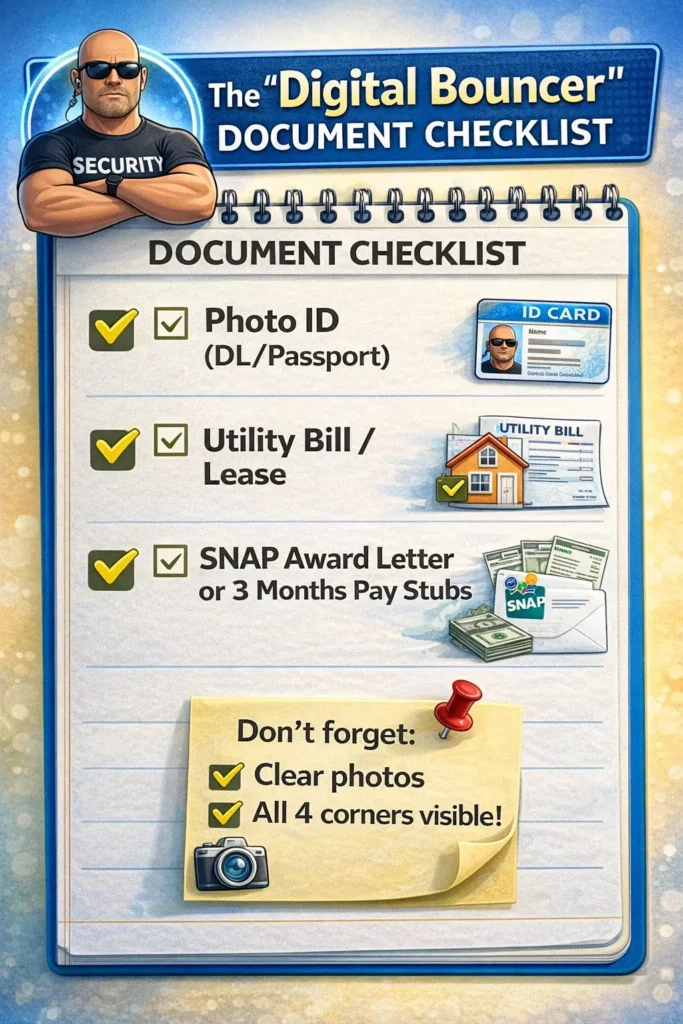
The National Verifier acts as a digital bouncer; it just needs to see specific “IDs” to let you through. Most of the time, you can just take a clear photo of these with your phone and upload them.
1. Proof of who you are (your ID)
They need to confirm your legal name, date of birth, and the last 4 digits of your Social Security Number (SSN) or your Tribal ID.
- Primary ID: A valid Driver’s License, State ID, or U.S. Passport.
- Backup (if needed): A Birth Certificate or your Social Security Card.
- For the SSN part: If your ID doesn’t show it, a W-2 from the last two years or a Tax Return from last year works perfectly.
2. Proof of where you live (your address)
The system needs to know your physical address (not just a P.O. Box).
- Utility Bill: A recent electric, gas, or water bill (dated within the last 60–90 days).
- Housing: A current lease agreement or mortgage statement.
- Official Mail: Any government letter or a W-2/tax return that clearly shows your name and address.
3. Proof of how you qualify
You only need to prove one of these paths, not both:
Path A: The easiest route of program participation
If you or someone in your home is in a program like SNAP or Medicaid, you’ll need:
- Award Letter: A recent benefit approval letter (dated within the last 12 months).
- Benefit Statement: A statement showing active enrollment.
- Medicaid/EBT Card: A photo of the card, if it shows an expiration date or issue date.
Path B: Household Income
If you’re applying based on your income (at or below 135% of the Federal Poverty Guidelines):
- Tax Return: A copy of last year’s State, Federal, or Tribal tax return.
- Pay Stubs: Three consecutive months of your most recent pay stubs.
- Benefits Statement: Social Security, Unemployment, or Workers’ Comp statements.
Helpful Pro-Tips for a Smooth Upload
- Keep it flat: When taking a photo of a document, place it on a flat surface with good lighting. If there’s a glare, the system might reject it.
- Show the corners: Make sure the entire page is in the frame. If the edges are cut off, they might ask you to redo it.
- Privacy check: You are allowed to black out (redact) your bank account numbers or sensitive medical info on these documents, as long as your name, address, and the date are clearly visible.
- Survivors of domestic violence: If you’re applying under the Safe Connections Act, have your Line Separation request or any supporting court/police documentation ready.
The honest opinion about performance
StandUp Wireless uses T-Mobile’s 5G network, which is one of the fastest and most widespread in the country. On paper, that’s great news! But, it’s important to be aware of a few “real-world” realities:
- The waiting line: Because this is a subsidized service, your data might sometimes get deprioritized. This just means that if the network is really crowded, you might notice slightly slower speeds compared to someone on a high-priced monthly plan.
- The devices: You’ll likely receive a budget-friendly phone or tablet (brands like Vortex, NUU, or Sky Elite). They’re perfect for checking emails, browsing the web, and staying in touch, but they might struggle a bit with very heavy gaming or professional video editing.
What the most guides often miss out!
Is it true that one person per household will get the lifeline? How to resolve glitches and activate services?
Applying for government programs can sometimes feel like you are standing right in the middle of a maze.
Here are a few things to keep in mind to make your journey smoother:
- The roommate rule: You might have heard only one phone per house, but that isn’t always true. If you live with roommates but don’t share money or bills, you are technically separate economic units and can often both qualify.
- The step 4 glitch: If you’re applying on their website and it seems to hang or freeze at Step 4 (the signature part), don’t panic! It’s a known bug. Try clearing your browser’s cookies or switching from Chrome to Firefox.
- The use it or lose it policy: This is a big one. To keep your service active, you need to use it at least once every 30 days, even just a quick text or a short call counts!
The troubleshooting guide
If you run into a roadblock, try these hacks that users have shared online to bypass common glitches.
- The activation paradox: The system might try to send an activation code to your new StandUp phone before it’s even active. If this happens, don’t keep trying; it will lock you out. Try calling 800-544-4441 from a different phone and ask the agent for a Manual OTA (Over-The-Air) Activation.
- The email mismatch error: If you’re trying to log in and it says your email is wrong, try using all lowercase letters, even if you normally capitalize the first letter. Their database can be very picky about case sensitivity.
- Signal drops: If your bars are low, go into your phone settings and try toggling 5G off so it only uses LTE/4G. In some areas, the 5G signal is still unstable for MVNOs, and a solid 4G connection is actually faster.
Not all services are perfect, but there are some hard truths most fail to deliver;
| The Upside Why people stay | The Downside Why people complain |
| Fastest setup: Compared to Safelink, StandUp usually gets your SIM or phone in the mail within 3-5 days. | The hard data cap: Once you hit your 4.5GB limit, the data doesn’t just slow down; it often becomes unusable for anything other than basic text emails. |
| Better support (611): In 2026, their phone support has improved. Agents are generally described as “patient” compared to competitors. | Cheap hardware: The free phones (Vortex/NUU) are prone to “freezing” if you have more than 3 apps open at once. |
| Simple portal: Once you are past the application glitches, the “My Account” area is very easy to use for checking your balance. | No eSIM yet: Unlike AirTalk or TAG, StandUp is still mostly a physical SIM-only service, so you have to wait for the mail. |
The 2026 Lifeline package
Since the ACP ended, the standard free plan has settled into this baseline for 2026:
What package includes is;
- Talk time: 1,000 Minutes (shared between incoming and outgoing).
- Text: Truly unlimited.
- Data: 4.5 GB of high-speed data (then throttled to 128kbps).
- Tablet Deal: A one-time co-pay of $11.00 for an 8″ or 10″ Android Tablet (usually a Vortex ZTAB).
Before engaging with any lifeline services, it is important to confirm that they will be operational when you need them most. Free doesn’t always come with only the option of not having good services.
If you still face some problems, remember that each problem has its unique solution.
StandUp Wireless isn’t perfect; it has its fair share of website glitches and hardware limitations, but it remains a vital lifeline for millions.
If you need to stay connected for work, school, or family, it’s a path worth exploring. Just go in with a little patience and the right information, and you’ll find your way through.
FAQ
I was with Q Link, and now I’m with StandUp. What happened?
Since the Q Link shutdown in 2025, many users were automatically transferred to StandUp. If your old phone stopped working, you likely need a new StandUp SIM card. You don’t need a new application; just call them to update your ICCID.
Why does my data say ‘Unlimited’, but it won’t load YouTube?
This is the #1 complaint on Reddit. The plan is “unlimited,” but only the first 4.5GB is at 5G speed. After that, it drops to “2G speeds,” which is too slow for video. If you need more, you’ll have to buy a $5 or $10″Top-Up.
Can I get the free tablet if I already have a phone?
Yes, but only once per “economic household.” If you already got a “free” device from another company this year, the National Verifier might block the tablet discount. You usually have to wait 12 months between device benefits.
Does the SIM work in a hotspot device?
Generally, no. StandUp SIMs are IMEI locked to phones or tablets. If you put it in a dedicated hotspot box, the system will likely flag it and suspend your service within 24 hours.